Commerce
Sell and serve, connected.
Commerce is the layer between what a customer chooses and what your team, your stock, and your books end up recording. Not a POS module bolted on the side — the connective layer for transactions.
- Table 12 — QR order placed
- Payment confirmed · GCash
- Sent to kitchen queue
- Stock adjusted — 2× Salmon Bowl
- Reported to Operations
What Commerce actually is
A customer shouldn't have to repeat a choice the system already has.
A table selected, a QR order placed, a reservation confirmed — each one is a signal. Commerce carries that signal into payment, into the kitchen or fulfillment queue, into stock, and into your reporting, instead of leaving each step to be re-entered by hand.
What it addresses
The gaps that show up between the counter and the books.
- Orders taken on one device and re-entered on another
- Payments that don't reconcile with what was actually sold
- Reservations tracked in a notebook while the till runs separately
- Kitchen or fulfillment teams working from a shouted order, not a system
- Sales across locations nobody can see in one place until month-end
- Customers repeating a choice they already made at the table or online
Core capabilities
What's inside Commerce.
Not every implementation uses all of these — an assessment scopes what your operation actually needs. We don't claim every payment provider or POS device is already supported out of the box.
Point of sale & payments
Counter, mobile, or self-serve — one till logic across every channel a sale can come through.
QR & online ordering
Guests order from the table or a link; the order lands in the same queue as everything else.
Reservations & waitlists
Bookings, tables, and capacity tracked against what's actually available, not a separate diary.
Kitchen & fulfillment routing
Orders route to the right station or team automatically, with status visible back to the front.
Transaction reporting
Sales, voids, and discounts recorded once and reflected in reporting without a manual reconcile.
Multi-location commerce
Consistent pricing and menus across sites, with each location's activity visible centrally.
From the running system
The guest side and the money side of the same order.
Both screens belong to TNG ERP. QR ordering and POS are capabilities inside that one ecosystem, not separate products bolted together — which is why the order a guest places on the left is the same record the cashier reconciles on the right.
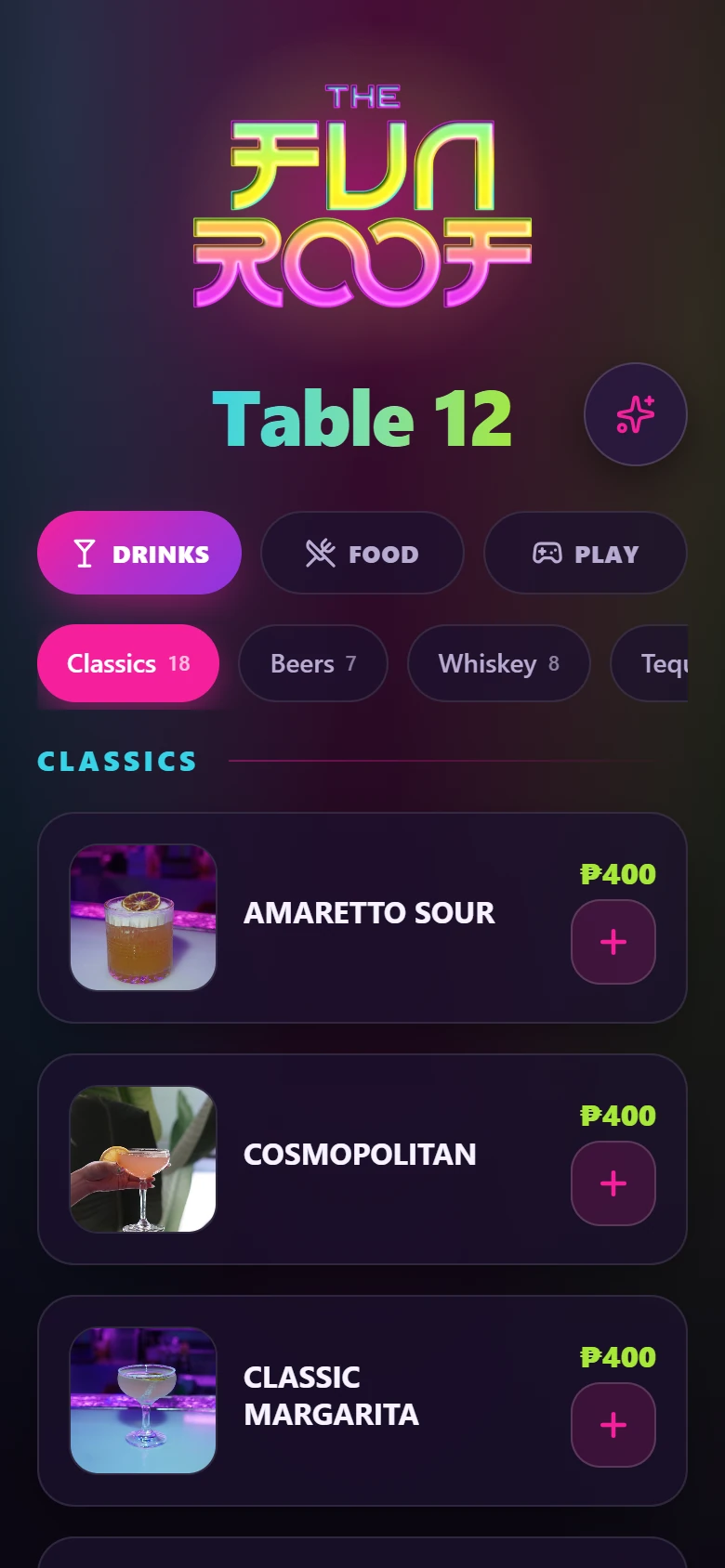
A guest scans the table QR and gets the venue's own branded menu — same ordering engine, different venue.
Demonstration route, demo table. No guest data appears.
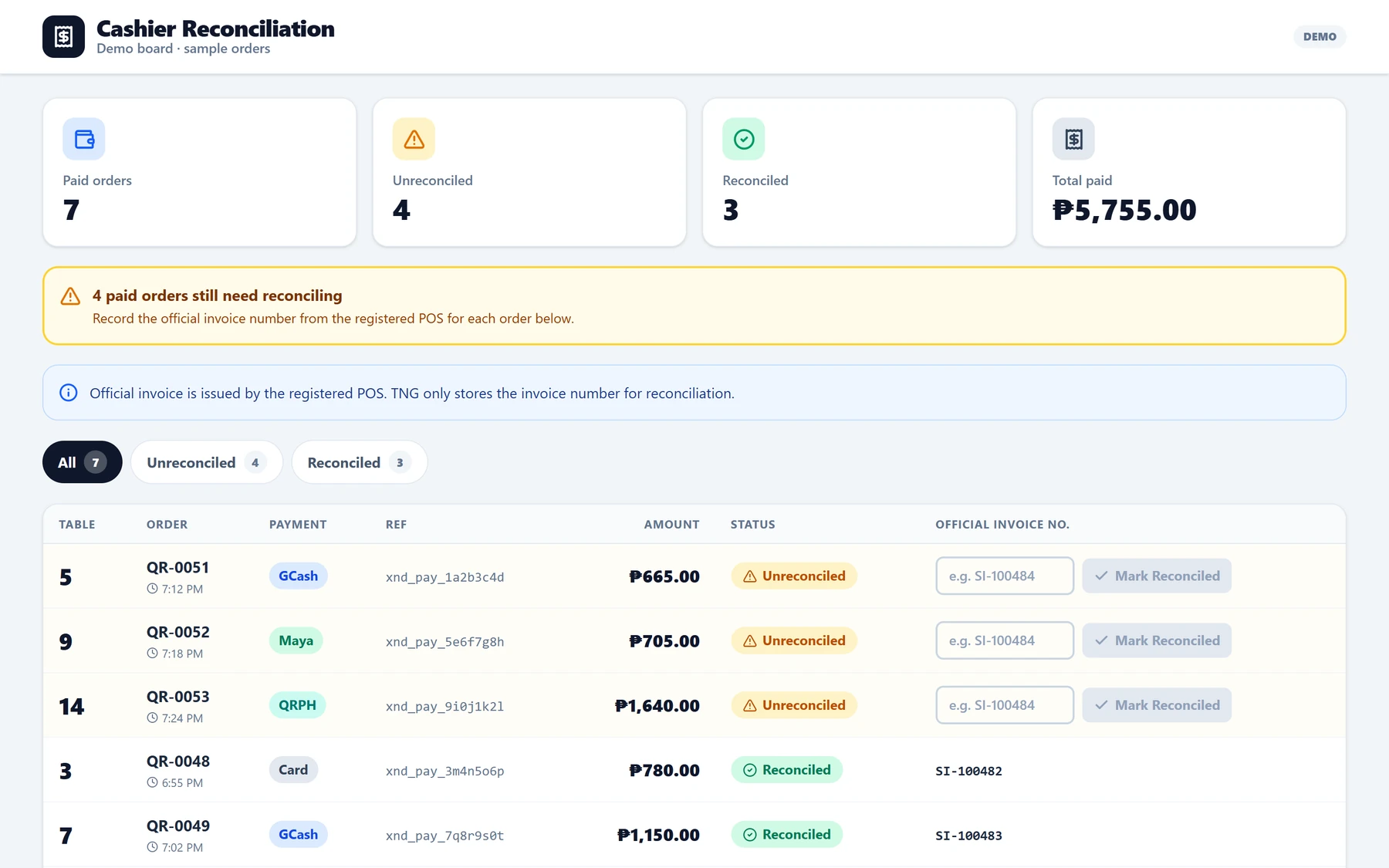
Paid against reconciled, order by order — with the official invoice number recorded against each one.
Demonstration board with sample orders and mock payment references, labelled DEMO in the product.
A concrete journey
Follow one order from the table to the report.
An illustrative example of how Commerce moves a single transaction through the rest of the operation.
- 1
Customer
A choice is made
A guest selects a product, table, or reservation — at the counter, a QR table, or online.
- 2
Payment
Carried forward
The system carries that choice into payment or confirmation. Nothing gets re-typed.
- 3
Team
Team notified
The right operating team receives the order or booking the moment it's confirmed.
- 4
Stock
Availability updates
Inventory, table status, or workload adjusts automatically as the order moves.
- 5
Management
Seen live
Management gets accurate transaction visibility without waiting for a report.
When it fits
Commerce is usually the right place to start when...
- Orders, payments, or reservations are still tracked outside one system
- Counter, QR, and online channels don't feed the same record
- Staff spend real time re-entering what a customer already told the system
- Owners can't see today's sales without calling a location or exporting a report
Operating context
Elion is a new identity, but Commerce is built on transaction systems the founder has actually run — not a demo built to look good in a pitch.
The Fun Roof
Operating systemQR ordering, POS, payments, reservations, and venue operations, running in a live venue.
Shoyuzuke
Operating systemOrdering, fulfillment, and customer experience, running as part of an active business.
Status reflects each system’s stage today, not a commercial claim. Verified screenshots and full case studies are in preparation and arrive in a later stage.
The next step
Start with a Systems Assessment.
A focused conversation about how your operation runs today, where it loses time, and what a connected system would change. No obligation to build anything.
In an assessment we
- Understand how your operation runs today
- Identify the disconnected systems and bottlenecks
- Map the highest-value improvements
- Decide together whether Elion is the right fit