Workspace
Coordinate the people who run it.
Workspace isn't a chat app with a business logo on it. Every conversation can carry the order, the approval, the task, or the alert it's actually about — so context doesn't live in someone's memory.
Order #0482 is ready for pickup — Table 12.
Every linked chip opens the real record — not a copy of it.
What makes it different
A message that's connected to the record it's about.
Generic chat tools are good at conversation and nothing else — the order, the approval, and the task all live somewhere separate, referenced by hand if at all. Workspace links the conversation to the actual operational object: a customer order, a purchasing request, an assigned employee, a report, or a system alert.
What it addresses
Where coordination quietly breaks down.
- Important context lives in a chat thread that eventually scrolls away
- Tasks get assigned verbally, then forgotten by everyone but the person waiting
- The same file gets shared in five threads, none of them the source of truth
- Approvals are requested in a DM with no record left afterward
- A new hire can't find how a past decision was actually made
Core capabilities
What's inside Workspace.
Not every integration or autonomous agent capability described here is production-complete for every deployment — an assessment scopes what's ready to connect today.
Team communication
Channels and operational spaces built around the work, not just around people.
Tasks & assignments
Work assigned with the context attached — not a task title with no background.
Files & documents
One place a document lives, referenced from wherever it's needed.
Approvals & events
Requests, approvals, and scheduled events tracked in the same space as the conversation about them.
Searchable operational knowledge
Past decisions and their context stay findable, instead of buried in scroll history.
AI assistants, human-reviewed
Assistants with controlled access to relevant context — sensitive actions keep a human in the loop.
From the running system
One sidebar for the whole group.
TNG Workspace puts the group's coordination in a single shell: command-centre channels at the top, technology and systems channels beneath them, direct messages, then each business with its own channels — the list continues past the bottom of this capture. An operator moves between them without moving between tools.
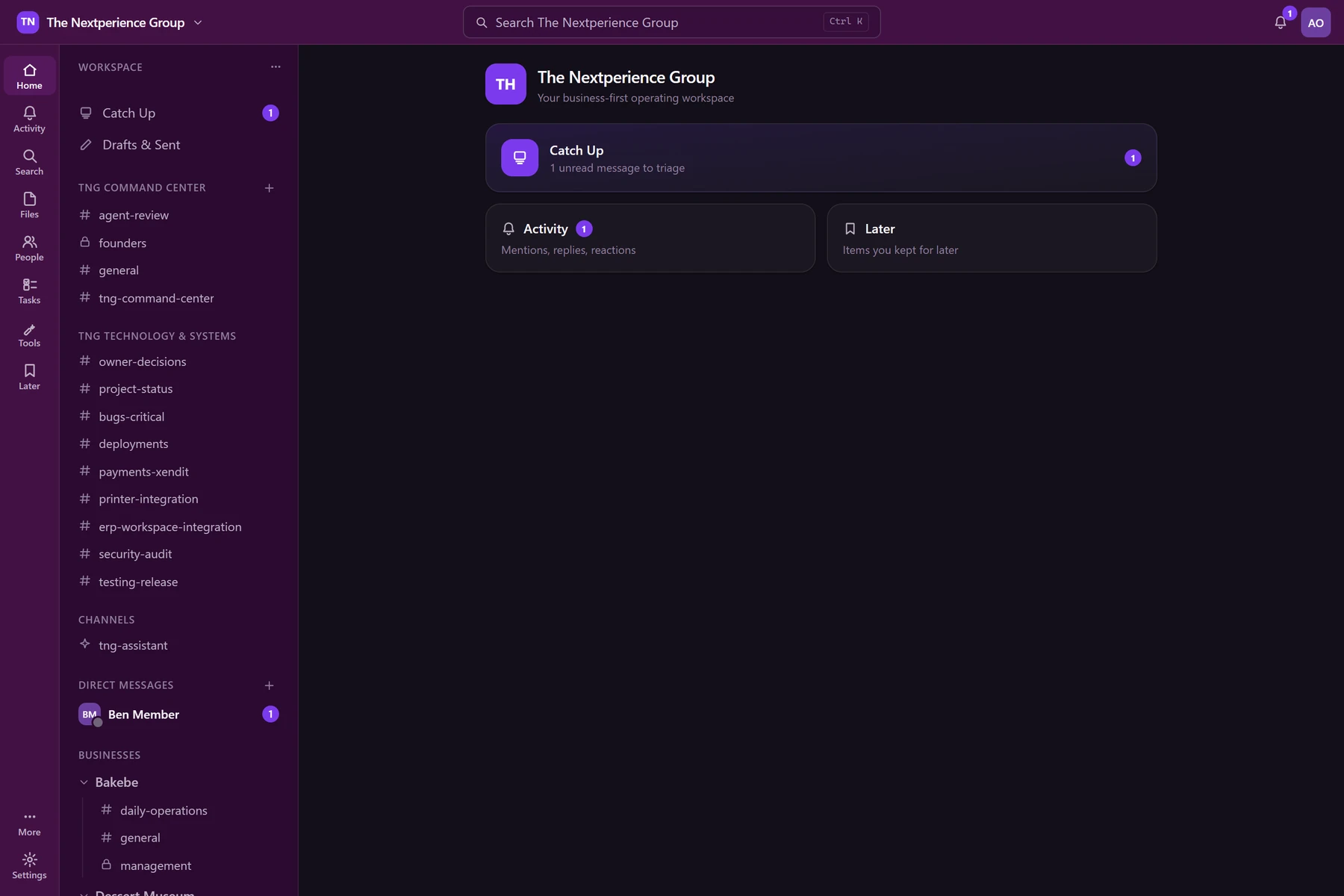
Six businesses, their channels, and their people under one shell — the operator's view of the whole group.
Local demonstration with seeded accounts. No real employee data is shown.
A concrete example
Follow one operational event into a conversation.
An illustrative example of how an event elsewhere in the system arrives in Workspace already carrying its context.
- 1
Event
Something happens
A purchasing request, an approval, or an alert is created elsewhere in the system.
- 2
Routed
Appears in Workspace
It shows up in the right channel or space — not buried in someone's personal inbox.
- 3
Context
Context attached
The people, the record, and the responsibility are linked automatically to the message.
- 4
Action
Someone acts
The assigned person responds, approves, or escalates from inside the conversation.
- 5
Record
It stays findable
The decision and its context remain searchable, not lost in a scroll history.
When it fits
Workspace is usually the right place to start when...
- Decisions get made in chat threads that later disappear
- Nobody can trace why or when an approval actually happened
- New hires can't find how something was decided before them
- People are already coordinating work across three or more separate apps
Operating context
Workspace is built on an internal coordination system the founder uses daily — labeled honestly for what's stable and what's still in development.
TNG Workspace
Internal deploymentCommunication, files, workflows, events, and employee coordination, used internally. AI-assisted features are under active development, not fully production-complete.
Status reflects each system’s stage today, not a commercial claim. Verified screenshots and full case studies are in preparation and arrive in a later stage.
The next step
Start with a Systems Assessment.
A focused conversation about how your operation runs today, where it loses time, and what a connected system would change. No obligation to build anything.
In an assessment we
- Understand how your operation runs today
- Identify the disconnected systems and bottlenecks
- Map the highest-value improvements
- Decide together whether Elion is the right fit